In Touch EMR

What is In Touch EMR?
In Touch EMR is an integrated medical software solution that combines electronic medical records and practice management capabilities within a single suite. The cloud-based application offers solutions across multiple clinical specialties, including behavioral health, physical therapy, speech therapy, home health, and more. Its AI-driven interface empowers providers to automate daily workflows, manage patient records, and deliver the best possible patient care.
The digital platform provides a single record location for patient health record management, mobile access, and documentation. It offers a multitude of features, such as appointment reminders, a patient portal, authorization countdown, patient scheduling, phone support, and advanced practice analytics. Patients can easily schedule appointments, upload documents, and receive follow-up notifications, while physicians can use the system to monitor a patient’s treatment on the go.
Furthermore, In Touch EMR software allows patients to securely communicate with their physicians, schedule appointments, access labs, and view clinical information, so they can participate more actively throughout their care process.
What are the Key Features of In Touch EMR?
Clinical Documentation
In Touch EMR automates the clinical charting process and consolidates patients’ medication histories, vitals, diagnoses, and other important details in a centralized location. It also comes with a variety of configurable templates that adjust seamlessly to a practice’s existing workflows and help users optimize efficiency.
Medical Billing
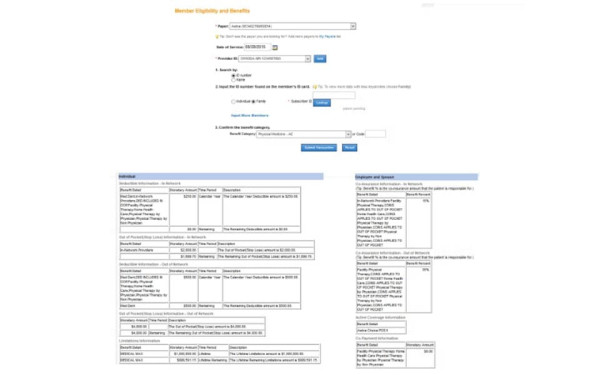
The application comes equipped with a powerful medical billing solution that automates day-to-day billing tasks to help practices get paid faster, eliminate redundant paperwork, and improve workflow efficiencies. It offers claims scrubbing, denial management, and insurance eligibility verification features to increase revenue outcomes.
Appointment Scheduler
The robust appointment scheduling solution within In Touch EMR software allows users to quickly view patient information and appointment details directly on the calendar. Practice staff can easily track patient visits, confirm provider availability, and send out automated appointment reminders, increasing patient traffic and reducing no-shows.
How Much Does In Touch EMR Cost?
In Touch pricing starts at $150 per month for their standalone EHR system, while the complete package starts at $300 per month. Below are feature specific add-ons that In Touch provides:
- In Touch Biller Pro Add-On: Automated billing software and clearinghouse access for $149 per licensed provider, per month
- Managed Revenue Cycle Billing: For revenue cycle management features, fees shift to a percentage of total collected revenue:
- $25,000 to $100,000 monthly collections: Fees as low as 6%.
- $100,000 to $200,000 monthly collections: Fees as low as 5%.
- $200,000+ monthly collections: Fees as low as 4%
In Touch EMR Reviews
In Touch EMR Medical Software boasts an overall satisfied consumer base. Many users love the program for its robust suite of clinical charting features, library of customizable templates, and ease of use.
Have feedback regarding this integrated healthcare IT platform? Share your software reviews with us in our Reviews section!
Our Thoughts
In Touch EMR is a user-friendly medical software solution that empowers healthcare organizations to operate efficiently, communicate strategically, and improve healthcare outcomes for their patients.
It is worth considering if you’re looking for an all-inclusive, scalable software solution for your healthcare clinic.




In Touch EMR Features

Appointment Management/Scheduling
E-prescriptions
Patient Portal
Compliance Tracking
Customizable Forms/Reports
Document Management
Lab Integration
Online Payments
Immunization And Allergy Tracking

Mobile App
Telemedicine
Order Management
Reporting And Analytics
Billing And Invoicing
Insurance Eligibility Verification
Claims Management
Inventory Management
Referral Management
Alerts/Notifications
Patient Demographics