EPOWERdoc

What Is EPOWERdoc?
Overview
EPOWERdoc is a comprehensive emergency department information system (EDIS) for hospitals, freestanding emergency centers, and urgent care clinics. The software offers a user-friendly interface and template design that allows both physicians and nurses to navigate patient charts quickly. It captures and shares accurate patient data in real time, reducing medical errors, enhancing patient care, and optimizing clinical decision-making.
What Is EPOWERdocBest Known For?
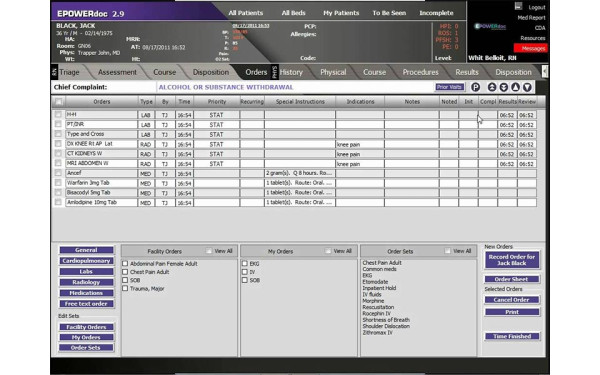
EPOWERdoc's emergency department documentation system stands out with its intuitive and easy-to-use interface that facilitates rapid navigation between patient charts. The patent-pending navigation features allow physicians and nurses to have multiple charts open simultaneously and switch between them with just one click, eliminating the need to return to the patient tracking board.
How Much Does EPOWERdoc Cost?
EPOWERdoc pricing ranges from $300–$500/month depending on the size and needs of the healthcare facility. There is no free trial or free version available.
Request a personalized EPOWERdoc pricing quote from our sales team today.
Disclaimer: Pricing references are based on publicly available third-party information and industry benchmarks. Actual costs may vary.
EPOWERdoc Integrations
EPOWERdoc offers an interface engine to facilitate smooth integration and data exchange between its EDIS software and hospital information systems (HIS). However, the vendor has not disclosed more information regarding its specific third-party integrations.
How Does EPOWERdoc Work?
Here's how you can utilize the software's dashboard after logging in:
- Navigate to the patient tracking board to view current patients
- Select a chart to document patient information and monitor treatment progress
- Choose the appropriate chief complaint or reason for the visit
- Document the history of the present illness and review assessments and treatment plans
- View notifications and updates on patient status and testing results
- Generate patient discharge slips for patient checkout
- Transfer patient records to the hospital EHR system upon admission or discharge
You can also schedule a free EPOWERdoc demo to learn more about the software’s functionalities.
Who Is EPOWERdoc For?
EPOWERdoc is suitable for healthcare facilities of all sizes. It typically caters to:
- Hospital Emergency Departments
- Freestanding Emergency Centers
- Urgent Care Clinics
- Micro Hospitals
EPOWERdoc Features
Here are a few key features of the software:
-
Electronic Medical Charting
The software simplifies documentation with handwriting, voice recognition, and keyboard input options, accommodating different provider preferences. It efficiently records patient complaints, ages, and genders, with over 340 complaint options per record. Additionally, the system also integrates risk management information without disrupting the documentation process and facilitates real-time data sharing between nursing and physician charts.
-
Patient Tracking
EPOWERdoc's patient tracking feature includes an electronic status board that provides a summarized view of all patient activity and bed availability on one centralized screen. It can be customized to fit the specific needs of hospitals and EDs. Emergency physicians can also define color codes and functions to meet client-defined standards, making it easy to view department status, patient load, or individual patient details.
-
Telemedicine
EPOWERdoc's TURBOdoc telemedicine platform offers a comprehensive web-based solution that ensures secure and HIPAA-compliant audio/visual telecommunication between patients and providers. With accessible options such as a mobile app or website portal, patients can directly access the platform to initiate a virtual encounter. Additionally, the solution features a virtual patient waiting room, enabling providers to track patient status and receive secure messages upon patient entry.
-
Management Reporting Module
This module allows users to easily generate detailed reports on emergency department metrics and activity. With customizable templates and an ad hoc report generator, they can analyze key data points captured during the electronic documentation process. Moreover, the software enables providers to either utilize pre-set options or customize reports with tools like Crystal Reports, MS Excel, or SQL Client.
Is EPOWERdoc Right For You?
If you are an emergency department or freestanding urgent care center in need of a comprehensive electronic documentation solution, EPOWERdoc may be the right solution. Its fully configured emergency department information system (EDIS) and industry-leading paper medical record templates help improve patient care efficiency, compliance and financial outcomes.
As a leading provider of emergency department information systems and paper template documentation systems, EPOWERdoc understands the complex needs of emergency care facilities. Its system is highly scalable and designed to meet the requirements of various departments, ranging from critical access hospitals to large tertiary care centers. Moreover, the vendor prioritizes data security and is ONC-ATCB certified to keep patient information private and secure.
Still not sure if EPOWERdoc software is the right choice for you? Contact us at (315) 215-3447 , and we will help you make the best decision.
EPOWERdoc Pricing Plans
Pricing varies based on your specific requirements.




EPOWERdoc Pros & Cons
PROS | CONS |
|---|---|
|
|
|
|
|
|
| |
|
EPOWERdoc Features

Appointment Management/Scheduling

E-prescriptions
Patient Portal
Compliance Tracking
Customizable Forms/Reports
Document Management
Lab Integration
Online Payments
Immunization And Allergy Tracking
Mobile App
Telemedicine
Order Management
Reporting And Analytics
Billing And Invoicing
Insurance Eligibility Verification
Claims Management
Inventory Management
Referral Management
Alerts/Notifications
Patient Demographics